From Chalkboard Sketches to Shared Working Documents
Shared working documents help a group keep ideas visible and usable. Learn how to fix unclear notes, scattered edits and records nobody revisits.
When a group’s shared working document fills with half-finished ideas, crossed-out decisions and edits nobody can explain, the problem is rarely a lack of effort. The document has stopped helping people think together. Shared working documents work best when the group treats them as a visible record of its progress, not a container for every thought anyone has had.
That purpose has a simple ancestor: marks on a board that everyone in a room can see. A chalkboard sketch lets people point, question and redraw in the moment. A digital document lets them return to those marks later, often from different places. The useful part is not the technology. It is the shared reference, and the group habits that keep it understandable.
When the document becomes a wall of notes
What happens: People add thoughts in different places, and nobody can tell which ones matter. A page that once made a conversation visible becomes a pile of fragments.
Why it happens: The group has mistaken visibility for organisation. On a board, people naturally cluster notes or draw connections as they talk. In a shared document, additions can accumulate without showing how one idea relates to another.
What to try, in order:
- Pause editing and state what the document is for: collecting possibilities, recording a decision, or tracking open questions.
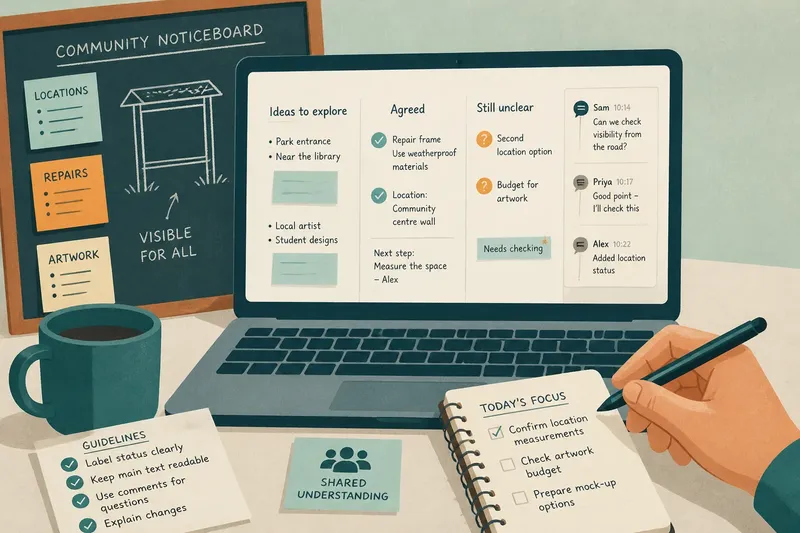
- Give existing material a few plain headings that reflect its role, such as “Ideas to explore”, “Agreed” and “Still unclear”.
- Move each note under the heading that fits. If the group cannot agree where it belongs, keep it visible as an open question rather than quietly deleting it.
- Ask someone to read the page from the point of view of a person who missed the conversation. Add only the context needed to make the notes intelligible.
For instance, imagine a volunteer group planning a community noticeboard. Its document contains suggestions for locations, repairs and artwork all mixed together. The group sorts the notes under those three topics, then marks which location ideas need checking. The expected result is that members can see what to discuss next without treating every suggestion as a decision.
When people cannot tell what has been decided
What happens: One person reads a sentence as a firm agreement; another remembers it as a suggestion. Later edits make the disagreement harder to trace.
Why it happens: A shared record often captures the words but not the status of the conversation. A chalk mark can be circled, erased or labelled while everyone watches. In a document, a sentence can look settled even when nobody confirmed it.
What to try, in order:
- Mark statements plainly as “Proposed”, “Agreed” or “Open”. Do not rely on tone or formatting alone.
- When the group makes a choice, write the choice in a complete sentence and note who needs to act on it, if anyone.
- Keep the alternatives that still matter nearby, with a short reason for the decision. Remove obsolete discussion only when it no longer helps explain the choice.
- Before closing the conversation, read the decision aloud and invite corrections. Then update the record while the group can still respond.
This is especially helpful when people contribute at different times. A clear status label gives someone arriving later a fair chance to distinguish the group’s current position from a thought still under discussion.
When edits collide or disappear
What happens: Two people rewrite the same passage, comments are buried, or a change removes wording someone needed to understand the point.
Why it happens: The group has not agreed how to make changes visible. Live editing tools can show activity, but they cannot decide which edits need discussion or who should resolve competing versions.
What to try, in order:
- Use comments for questions and proposed changes that need a response; use the main text for wording the group is ready to keep.
- When changing a decision or shared statement, leave a brief note explaining what changed and why.
- If two edits conflict, restore the last wording the group understood, then resolve the disagreement in conversation rather than layering both versions together.
- Use the document’s version history when the group needs to inspect or recover an earlier draft. Treat it as a reference, not a substitute for a clear current record.
For working together, a tool such as Google Docs or Microsoft Word can make comments and revision history easier to find. Choose based on what the group can access and use comfortably; a simple shared text file may be enough for a small, low-complexity task.
When a useful record is hard to revisit
What happens: The group has a decent record, but members cannot find the right version or do not know whether it is still current.
Why it happens: Documents often outlive the conversation that created them. Without a recognisable title, clear owner or sign of its status, a useful page can become just another file in a shared folder.
What to try, in order:
- Choose a title that names the project and the document’s purpose, not just “Notes” or “Working copy”.
- Keep the current record in one agreed place, such as a project folder or pinned channel link.
- Add a brief line near the top stating what the document covers and whether it is current, in progress or archived.
- When work ends, move the record to an archive or mark it closed so it does not appear to be an active instruction.
These small signals matter because a shared document is useful only if people can recognise it and understand its status when they return.
What should a shared working document contain?
Should every comment go into the main text?
No. Keep the main text readable, and use comments for questions or wording that still needs discussion. Bring a comment into the body only when the group has resolved it and the answer belongs in the record.
How can a group show that an idea is not a decision?
Label it “Proposed” or “Open”, and keep it apart from agreed points. A reader should not have to infer status from colour, placement or who wrote the sentence.
What if some members prefer a physical board?
Use the board for live, visual discussion if it suits the group, then transfer the durable points into the shared record. Preserve connections, open questions and decisions rather than copying every mark.
How often should the document be tidied?
Tidy it when a conversation produces a decision, when several people have added material, or before someone new needs to use it. A brief edit at those moments is easier than reconstructing the meaning later.
Keep the record useful, not exhaustive
A shared working document does not need to preserve every sentence a group says. It needs to show what the group is considering, what it has decided and what remains unresolved. That is the thread connecting a chalkboard sketch to a document people can revisit: visible marks become useful when others can read their meaning.
When the page starts to feel confusing, do not begin by choosing a more elaborate tool. Clarify its purpose, make the status of ideas visible, resolve competing edits and give the current record an easy home. Shared working documents can then support the group’s thinking without pretending to replace the conversations that shaped them.